We’re proud and delighted to announce we’ve given birth to a new theme for Spiffy Stores. And it’s a cracker!
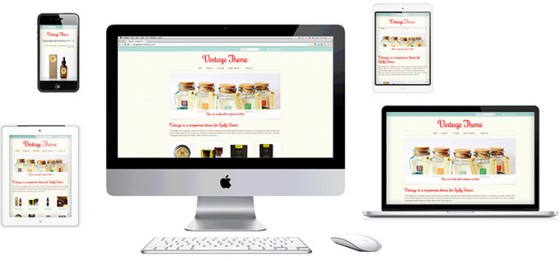 Vintage, our most flexible theme yet, is a fully responsive design. The layout will automatically adapt to the screen size it’s viewed on, whether that’s a smart phone, a tablet or a laptop. In fact, it will always look its best on any screen width from 320 pixels to over 2500.
The Vintage theme gives you 6 elegant styles to choose from: Cupcakes, Fresh Linen, Natural, Vintage Velvet, Mellow Yellow, plus a bonus “Not So Vintage” style. You can re-colour each of these styles to get it looking exactly how you want too!
And we’ve included a bucket load of customisable features such as…
- 4 levels of drop-down menus so you can make really specific product categories
- Cool 5-image homepage slideshow, with 3 different transitions, captions and links, so you can tailor each one to a different message
- 24 funky heading typefaces and unlimited colour schemes so you can style it just the way you like it
- Customisable product pages with custom product fields, dynamic image zoom and related product up-sells
- Display featured collections on your home page with support for collection images (new feature!).
- Featured collection pages with support for collection images (new feature!) so you can show off your different product categories on one page.
- Social media integration to grow your audience on your Facebook, Google +, Twitter, Pinterest, Instagram, Flickr, YouTube and LinkedIn pages
- Newsletter integration with MailChimp, Campaign Monitor or Mad Mimi so you can sign up visitors to your email list through our simple form.
- Built-in icons for payment methods like PayPal, Visa, MasterCard, AMEX, and Bank Deposit.
- Matching checkout styles with your logo and colours.
Sound good? Why not take a look around this baby in the Vintage theme demo store we’re building. While you’re there, try clicking and dragging the bottom right corner of your browser window in and out. You’ll see the seamless and dynamic resize in action!
If you want to apply the Vintage theme to your store, just navigate to the “Design & Assets > Theme gallery” section of your Toolbox and update your templates with one click. Don’t forget to save your current theme by downloading it first so you can restore it later if you’d prefer to use it instead.
Instructions on how to make changes to the Vintage theme to get it to suit you perfectly, along with previews of the different built-in styles and fonts can be found in the Vintage theme guide in our Knowledge Base.
 Don’t say we don’t spoil you!
 A blog is an important part of any business’s online marketing toolkit. If your posts are frequent, interesting and well-written, they’ll help you build a relationship with your visitors and attract new traffic to your site. What’s not to like about that!
 Aaargh! It’s that time of year again… It seems like only yesterday I was packing away the baubles and vacuuming glitter off the rug, but now there are less than 7 weeks till the Big Day.
 Back in the days when Mum wore a pinny and Dad sported a hat to work, shopping wasn’t the soulless chore it is now. It was a social event.
 The answer is already in your hands. And it’s free.
 Readers of this blog will know I’m a huge fan of taking photos with my iPhone.
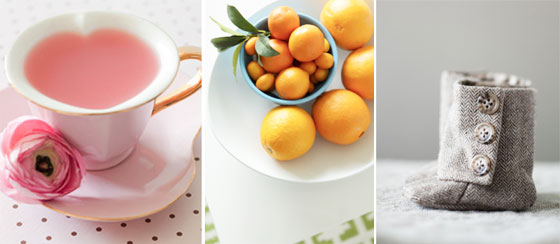 A great product image is essential if you want to sell your goodies online. But we can’t all afford to have professional photos taken, and manufacturers’ photos can be a bit, well… dull, can’t they.