
Sneak peek: New toolbox changes

Just thought we should let you know that we’re making a few changes to your Toolbox tomorrow afternoon, and over the coming weeks.

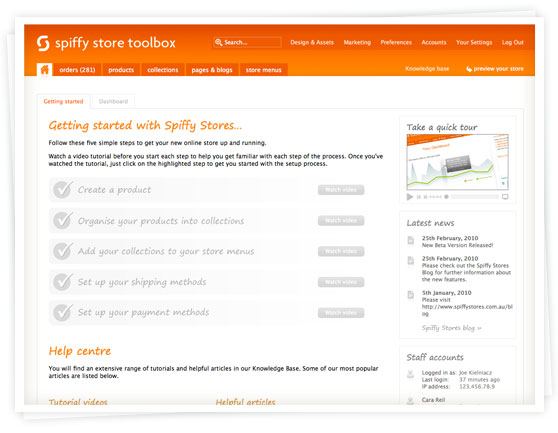
The first thing you’ll notice is that we have a new, fresher colour scheme.  We’re streamlining the design to make things a lot clearer and easier to find.

The second thing you may notice is that we’ve added a new “Getting started” section to the dashboard to make it easier for new store owners to get their store up and running.

Over the coming weeks, we’ll be adding in new enhancements to help make managing your store a lot easier, so stay tuned!

International shipping with FedEx now available

We’re pleased to announce that Spiffy Stores now includes FedEx shipping calculations in your store checkout, in addition to the current support for Australia Post.

To accommodate this, we’ve created a new section in your Store Toolbox (in the Shipping & handling section of your preferences) for “Shipping agents”.

To enable international shipping by FedEx, you just need to go to the “Shipping and handling” section in your Store Toolbox, and click on the “Add shipping agent” button.  You’ll need to have an account with FedEx to take advantage of this.

When you’ve got that sorted, customers visiting your online store from overseas will be able to select FedEx as a shipping method in the checkout, and view real-time shipping prices.

We’ve also changed the way the Australia Post shipping is handled.  We’ve now updated your current Australia Post shipping methods to use the new Australia Post carrier.  Please go to your Store Toolbox and review your shipping rates and ensure that they’re set up correctly.

New functionality you say?  It includes adding extra handling days, extra handling costs, and default fall-back pricing just in case the FedEx or AusPost sites fail…. but you’ll have to come back tomorrow to find out more, or login to your Store Toolbox to have a look.
PayPal Express now available

If you’re especially observant, you may have noticed the PayPal Express Checkout button in the Showtime Theme demo that we posted yesterday.  I can confirm that yes! PayPal Express Checkout has been added to Spiffy Stores, and can be set up to replace (or along-side) the PayPal option in the checkout.



Enabling Paypal Express Checkout in your store should help decrease the number of abandoned carts/orders that store owners experience who rely on PayPal to process transactions, as it takes the customer directly to the PayPal checkout from the shopping cart page to place their order.

We’ve been hard at work adding a little tag to everyone’s store to support the new feature, and it’s been included in all of the Spiffy Stores e-commerce themes.  If you’ve somehow missed out, and want to add the button to your store, there are instructions on how to do this in our knowledge base.

Special deal from Camtech Payment Gateway

Camtech recently contacted us with a great deal that is exclusive to Spiffy Stores owners.

They are offering a low annual fee, and a 40¢ transaction fee.  Comparable services have a higher annual fee and/or transaction fee.

The Camtech Payment Gateway provides an easy and cost-effective way to accept real-time online payments.  Camtech integrates with Australia’s major banks, and is now fully integrated with Spiffy Stores, allowing merchants to process real-time transactions in their checkout.

Camtech have a simple signup process, and can even help with your application for a merchant facility at the bank.  They are undoubtedly the best value payment gateway in Australia, and if you find a better advertised rate they will beat it by 10%.

For more information about Camtech, and to take advantage of the exclusive deal for Spiffy Stores owners, visit the Camtech site at http://www.camtech.com.au

To receive this special pricing offer, make sure you select the ‘Custom Pricing Plan’ option when signing up with them.

The minimal theme just got spiffier!

New Spiffier minimal theme for Spiffy StoresWe’ve just updated the minimal theme so that now it can be re-coloured in your theme editor.  You can now easily add your logo, add images to your slideshow, change your store background colour, the colour of your navigation, your links, as well as your text, footer background, and footer text.

The best thing of all is that all of your colour changes are also reflected in your checkout, which also exactly matches the colour scheme you’ve created.

It comes with a few different colour schemes built-in as well, which you can see by clicking on the image to the right.

Email Marketing Made Easy

Email marketing in your e-commerce storeWe’ve just released a bunch of new features, and this is the first of a series of blog entries to let you know about the changes.

As you’re probably aware, email marketing is an important part of  running an ecommerce site. At Spiffy Stores we’re always on the lookout to find new and better ways to help you run and promote your online store.

The first of these changes is a feature to help you create an email marketing mailing list. To recognize the importance of Email marketing, we’ve added a whole new section under “Marketing” in your store toolbox for the subject.

Continue reading →