Setting the default Home page title and description
From Spiffy Stores Knowledge Base
SEO for the Home Page
It is important to set the values of the <title> and <meta name="description"> tags for the Home page as this is the central page of your store for Search Engine Optimization (SEO) purposes.
By default, these tags have generic values, but these can be changed by adding the following modifications to your theme.settings file.
If you don't currently use a theme.settings file to configure your theme customizations, you can find further information on Theme customization at Theme Settings.
Some theme designers may have already incorporated these modifications into their themes, so check the available settings in your Theme Editor first.
Theme.settings Modifications
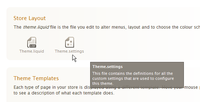
Theme.settings
Theme Editor

In order to override the built-in title and description values for the home page, just copy and paste the following code into your theme.settings file. You will find this file in the "Theme editor" section. Just click on the file icon to edit the file.
At the bottom of the file, copy and paste in the following code:
  Section: [Home page]
    default_title: {
      label: "Default title",
      type: text
    }

    default_description: {
      label: "Default description",
      type: textarea
    }
This code defines two new fields, default_title and default_description. Once these have been added to the theme.settings file, you will be able to enter values for these two fields in the Theme editor.