How to edit your Store Menus: Difference between revisions
From Spiffy Stores Knowledge Base
m Created page with 'You can create and edit your Store Menus by going to the "Store Menus" section of the Toolbox. You will find a list of your current menus' |
mNo edit summary |
||
| Line 1: | Line 1: | ||
<gallery heights="200px" widths="200px" class="right"> | |||
Image:Spiffy-store-toolbox-navigation-page.png|Store menus page | |||
</gallery> | |||
You can create and edit your Store Menus by going to the "Store Menus" section of the Toolbox. | You can create and edit your Store Menus by going to the "Store Menus" section of the Toolbox. | ||
Here you will find a list of your current menus. | |||
Revision as of 12:10, 23 March 2010
-
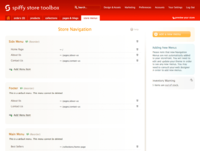 Store menus page

You can create and edit your Store Menus by going to the "Store Menus" section of the Toolbox.
Here you will find a list of your current menus.