Help: Dashboard: Difference between revisions
From Spiffy Stores Knowledge Base
No edit summary |
|||
| Line 3: | Line 3: | ||
The Spiffy Store Toolbox Dashboard gives you an overview of how your store's operations. | The Spiffy Store Toolbox Dashboard gives you an overview of how your store's operations. | ||
<gallery widths=200px heights=200px> | <gallery widths=200px heights=200px class="centre"> | ||
File:Help Dashboard1.png|Dashboard Statistics | File:Help Dashboard1.png|Dashboard Statistics | ||
</gallery> | </gallery> | ||
Revision as of 13:26, 23 February 2010
Your Dashboard
The Spiffy Store Toolbox Dashboard gives you an overview of how your store's operations.
-
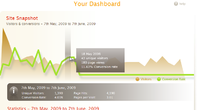 Dashboard Statistics

In the main body of the page you will find a Site Snapshot which contains an interactive graph showing the number of visitors to your site and the corresponding conversion rates for each day in the last month.
By hovering your mouse over any portion of the graph, you will see a popup tab showing some detailed statistics for that day.