Weight-based shipping rates: Difference between revisions
From Spiffy Stores Knowledge Base
mNo edit summary |
mNo edit summary |
||
| Line 1: | Line 1: | ||
Weight-based shipping rates use the total weight of the shopping cart to determine which shipping rate will apply in calculating the shipping costs. | Weight-based shipping rates use the total weight of the shopping cart to determine which shipping rate will apply in calculating the shipping costs. | ||
=== | === Add a weight-based shipping rate === | ||
<gallery heights="200px" widths="200px" class="right"> | <gallery heights="200px" widths="200px" class="right"> | ||
Revision as of 12:35, 6 June 2011
Weight-based shipping rates use the total weight of the shopping cart to determine which shipping rate will apply in calculating the shipping costs.
Add a weight-based shipping rate
-
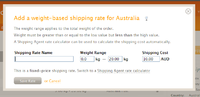 Add a weight-based shipping rate

Shipping rates can be created and managed from the "Preferences -> Shipping & handling" page of the Toolbox.
Select the destination country and click on the "Add a weight-based rate" link. If no shipping rates are defined already then you will see a message informing you that rates need to be defined. Click on the "add one" link.