Vintage theme features
From Spiffy Stores Knowledge Base
Revision as of 13:47, 8 November 2013 by Shawn (talk | contribs) (→Beautiful home page slideshow with optional captions and links)
Vintage is a Spiffy Stores theme which dynamically adjusts for all screen sizes and devices. Your shop will look great... whether you're on a desktop, laptop, tablet or an iPhone. Resize your browser to see it in action!
This theme includes four styles: Linen, Paper, Stone, Wallpaper and Cupcakes. View all four demo stores to see the variety of theme settings.
Contents
- 1 Fully responsive
- 2 Multi-level drop-down menus
- 3 Beautiful home page slideshow with optional captions and links
- 4 Display collections wherever you want!
- 5 Email marketing integration
- 6 Social media integration
- 7 Credit card icons for accepted payment methods
- 8 Customisable product page
- 9 Matching checkout styles
- 10 Related pages
Fully responsive

Your store is viewed on screen widths ranging from 320 pixels to over 2500 pixels. These are dramatically different sizes, and it's becoming more varied with every new device. The beauty of the Vintage theme becomes obvious when you see your store on smart phones, tablets, and widescreen desktop browsers.
It’s as if your shop was redesigned to perfectly fit that specific environment!
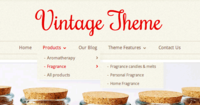
Built-in drop down menus

The Vintage theme supports up to 4 levels of drop-down menus.
There's no mucking about with code to get your drop-down menus working. You can create them simply in 5 simple steps!
- Create a menu item that links to a page, product, or collection
- Create another one
- Click the "Reorder" link
- Drag the one you want to drop down to the right (underneath the one above)
- Click "Done reordering"
Beautiful home page slideshow with optional captions and links
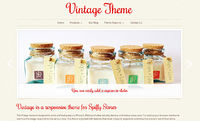
Home page slideshow

Your slideshow can have up to 5 images, with a choice of 3 different transitions. You can also add links to other pages, and a caption to each slide as well.
The slideshow resizes for different devices, and looks gorgeous on tablets and phones.
Display collections wherever you want!
Let's say you want a page (or a collection page) that lists your store's categories. You just need to create a menu with the same name as your page and add links to the collections you want to feature. Each of the links can also display a slideshow of the first 5 products in your collection, or can display the image you have specified for that collection in the "Collections" section of your store's Toolbox.
In the theme demo store, the "Aromatherapy" page displays the collections that have been added to a menu also called "Aromatherapy".
Email marketing integration
Integrate with MailChimp, Campaign Monitor or Mad Mimi by displaying a signup form in your store's footer. Instructions on how to integrate can be found in the Connecting your email subscriber form tutorial.
Social media integration
On product pages and blogs, you can enable Facebook likes, Facebook share, Google +1, Twitter and Pinterest buttons. You can also add links to your Facebook, Google +, Twitter, Pinterest, Instagram, Flickr, YouTube and LinkedIn pages in your footer. This can be done in the Theme editor section of your store's Toolbox. Click here for a tutorial.
Credit card icons for accepted payment methods
Lorem ipsum dolor sit amet, consectetur adipisicing elit, sed do eiusmod tempor incididunt ut labore et dolore magna aliqua. Ut enim ad minim veniam, quis nostrud exercitation ullamco laboris nisi ut aliquip ex ea commodo consequat. Duis aute irure dolor in reprehenderit in voluptate velit esse cillum dolore eu fugiat nulla pariatur. Excepteur sint occaecat cupidatat non proident, sunt in culpa qui officia deserunt mollit anim id est laborum.
Customisable product page
Customise your product page by showing or hiding sections, adding custom fields, or switching the layout from left to right.
Custom product fields
Lorem ipsum dolor sit amet, consectetur adipisicing elit, sed do eiusmod tempor incididunt ut labore et dolore magna aliqua. Ut enim ad minim veniam, quis nostrud exercitation ullamco laboris nisi ut aliquip ex ea commodo consequat.
Dynamic product zoom
Lorem ipsum dolor sit amet, consectetur adipisicing elit, sed do eiusmod tempor incididunt ut labore et dolore magna aliqua. Ut enim ad minim veniam, quis nostrud exercitation ullamco laboris nisi ut aliquip ex ea commodo consequat.
Decide which sections you'd like to show
Lorem ipsum dolor sit amet, consectetur adipisicing elit, sed do eiusmod tempor incididunt ut labore et dolore magna aliqua. Ut enim ad minim veniam, quis nostrud exercitation ullamco laboris nisi ut aliquip ex ea commodo consequat.
Related products
Lorem ipsum dolor sit amet, consectetur adipisicing elit, sed do eiusmod tempor incididunt ut labore et dolore magna aliqua. Ut enim ad minim veniam, quis nostrud exercitation ullamco laboris nisi ut aliquip ex ea commodo consequat.
Matching checkout styles
Lorem ipsum dolor sit amet, consectetur adipisicing elit, sed do eiusmod tempor incididunt ut labore et dolore magna aliqua. Ut enim ad minim veniam, quis nostrud exercitation ullamco laboris nisi ut aliquip ex ea commodo consequat.
Related pages
- The Vintage theme guide
- Vintage theme features
- Frequently asked questions
- Uploading your logo
- Selecting & modifying your colour scheme
- Selecting your title font
- Editing your store's menus
- Updating your home page
- Editing your slideshow
- Adding featured collections to your home page
- Adding featured collections on other pages
- Connecting your email subscriber form
- Enabling Facebook comments
- Connecting to your social media accounts (Facebook, Twitter, Google + etc.)
- Displaying icons for your accepted payment methods